THE_STRIP 3 Profiles: The One Minute That Makes AUTO-MIX Nail Your Mix
AUTO-MIX in THE_STRIP 3 sets up, unmasks, pans and balances a whole session with one button, and every one of those decisions starts from each track's profile. Here's how to check the profiles, find the closest fit for any instrument by typing its name, and build your own profile from a reference track in about a minute.
You press auto-mix. It comes back clean, levelled, balanced — and it still isn't your song.
It's almost never the processing. It's the brief: nobody told the mix what each track is for.
So I made that brief visible in THE_STRIP 3 — and put you in charge of it.
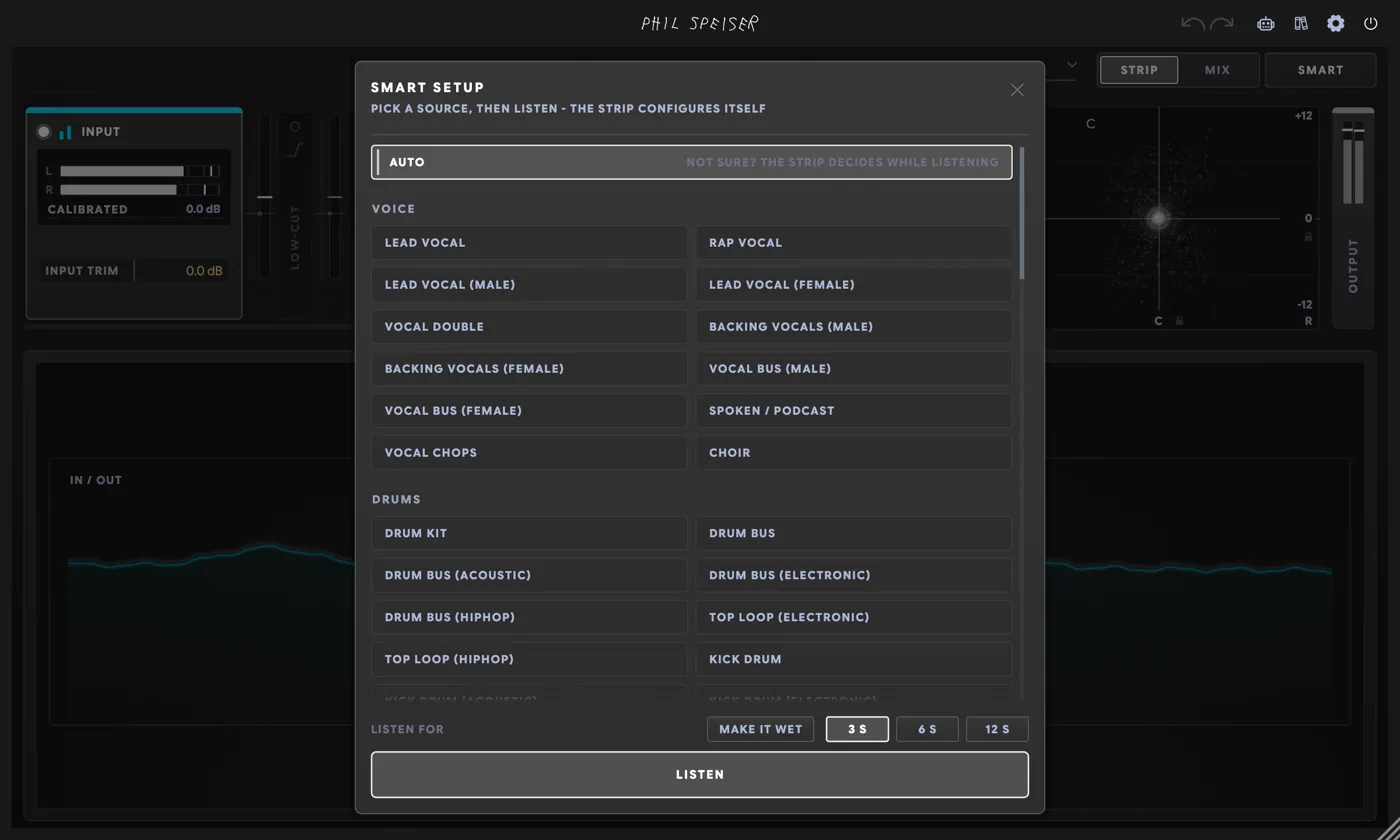
Every instance of THE_STRIP 3 carries a profile, and AUTO-MIX reads all of them before it moves a single fader. Checking them takes a minute.
What Is a Profile in THE_STRIP 3?
The answer to one question: what is this track, and what's its job?
| The profile decides… | …so AUTO-MIX knows |
|---|---|
| Its family group | Which section it's levelled with |
| Its rank in UNMASK | Who steps back for whom |
| Track, bus or master | Whether it plays in the mix or glues what's below it |
| Its place on the stage | Leads and bass stay centred; doubles and backings go wide |
A vocoder tagged VOCAL CHOPS gets levelled with the synths. Tagged BACKING VOCALS (MALE), it goes wide and steps back behind the lead. Same audio, different mix.
How Do I Check the Profiles Before AUTO-MIX?
THE_STRIP 3 on every stem and the master, then press M.
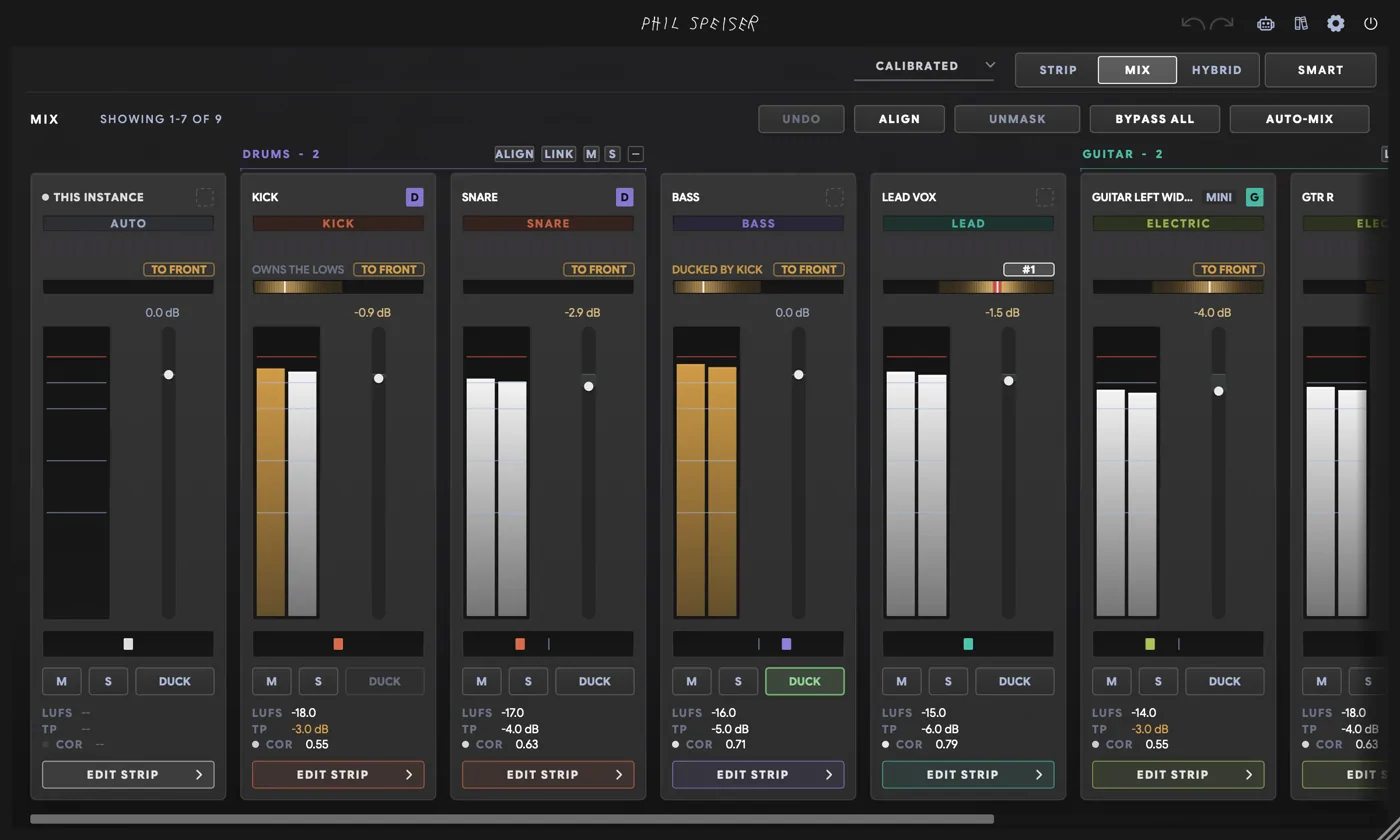
Every card wears its profile on a type chip, grouped by family. The strip guesses from your track names and from listening — a good guess, but it hears the sound, and only you know what the part is meant to do. Walk the cards once and fix what's off.
What If No Profile Matches My Instrument?
My vocoder sat in the SYNTH group as VOCAL CHOPS. There's no vocoder among the 81 profiles — so I clicked the chip and typed the word.
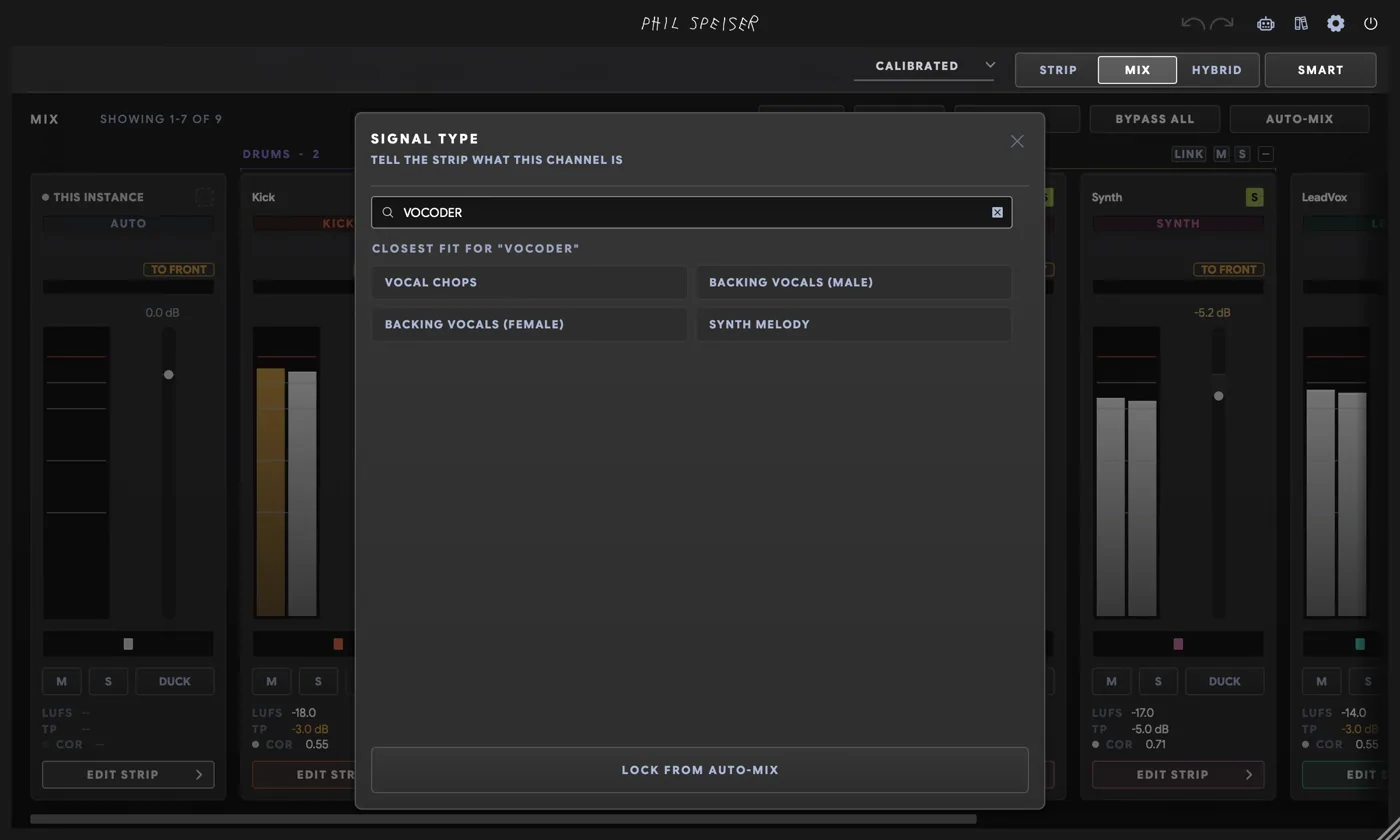
THE_STRIP 3 reads it like a track name and offers the closest fits: VOCAL CHOPS, BACKING VOCALS (MALE), BACKING VOCALS (FEMALE). One click, then I moved the track into the VOICE group. The same works for ukulele, harp, juno — and for instrument words in German, French, Spanish, Italian and Portuguese.
How Do I Build My Own Profile From a Reference Track?
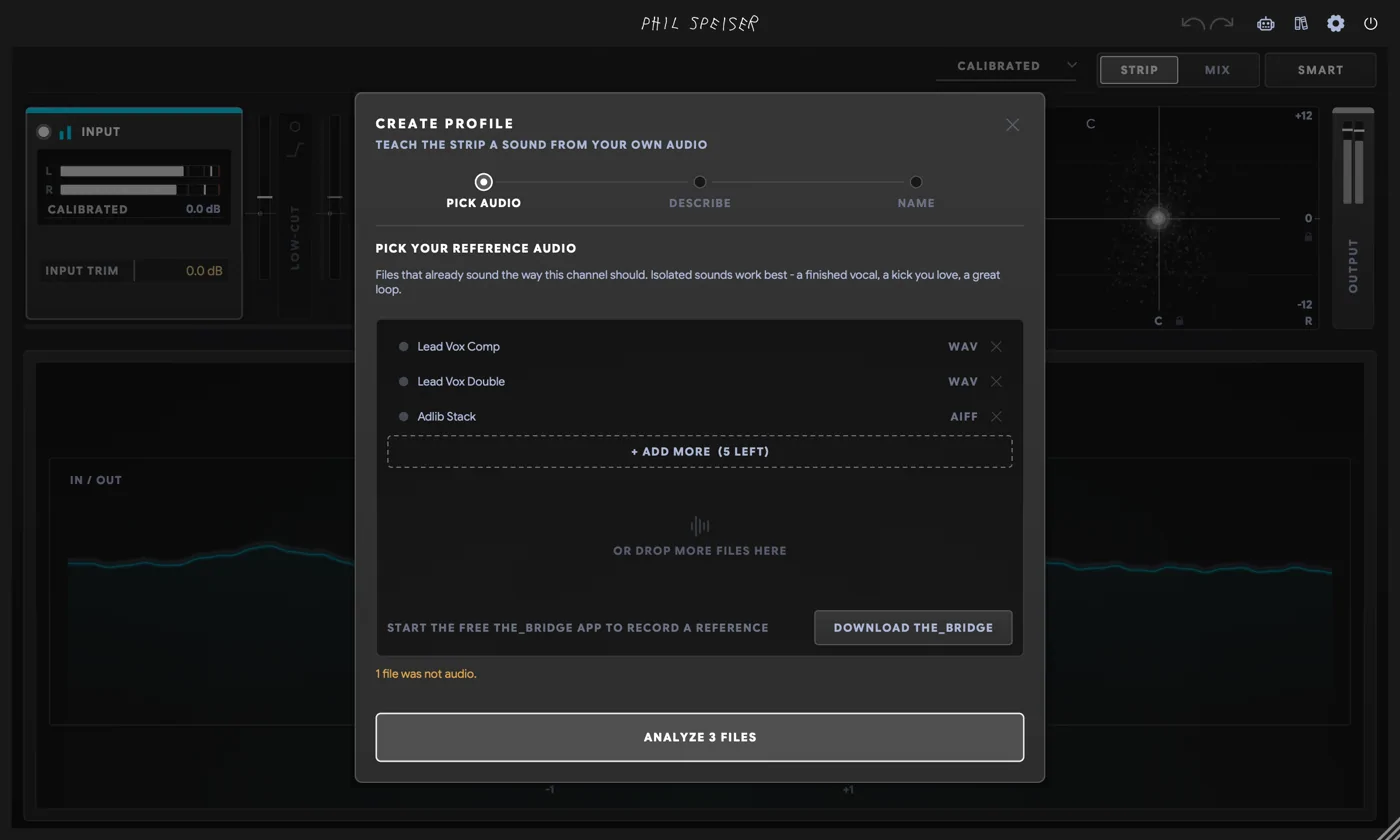
The factory profiles are starting points. This was an R&B song, and I wanted the master to know that. On the master card: type picker, then + CREATE PROFILE.
Drop in up to eight files — or record the sound you want with THE_BRIDGE, my free companion app for macOS and Windows. Its RECORD tab captures your mic or SYSTEM AUDIO: whatever your computer plays, in any app, with no routing.
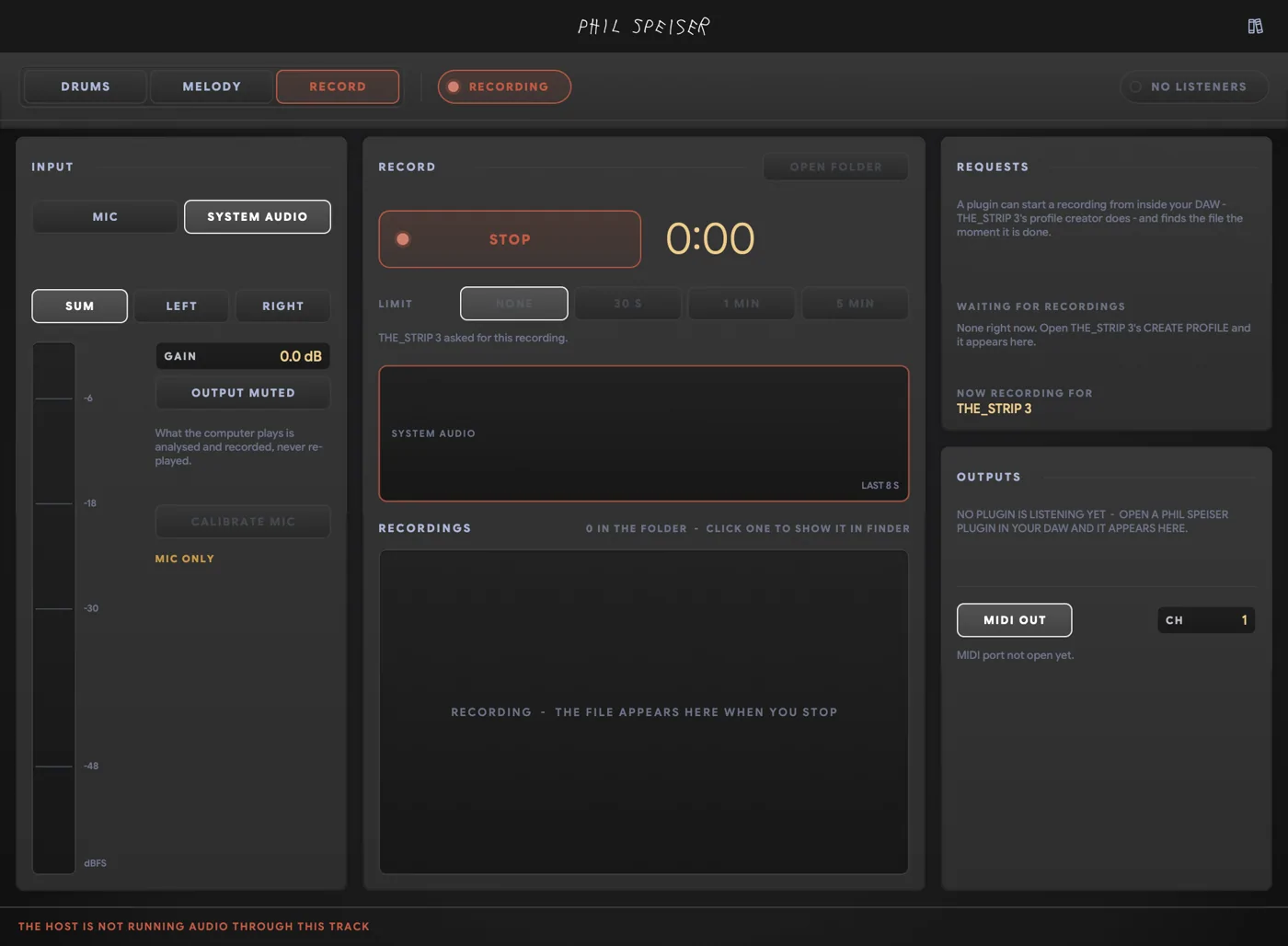
THE_STRIP 3 shows up under REQUESTS, and the recording lands straight back in CREATE PROFILE when you stop. I played a royalty-free R&B instrumental in my browser and hit record.
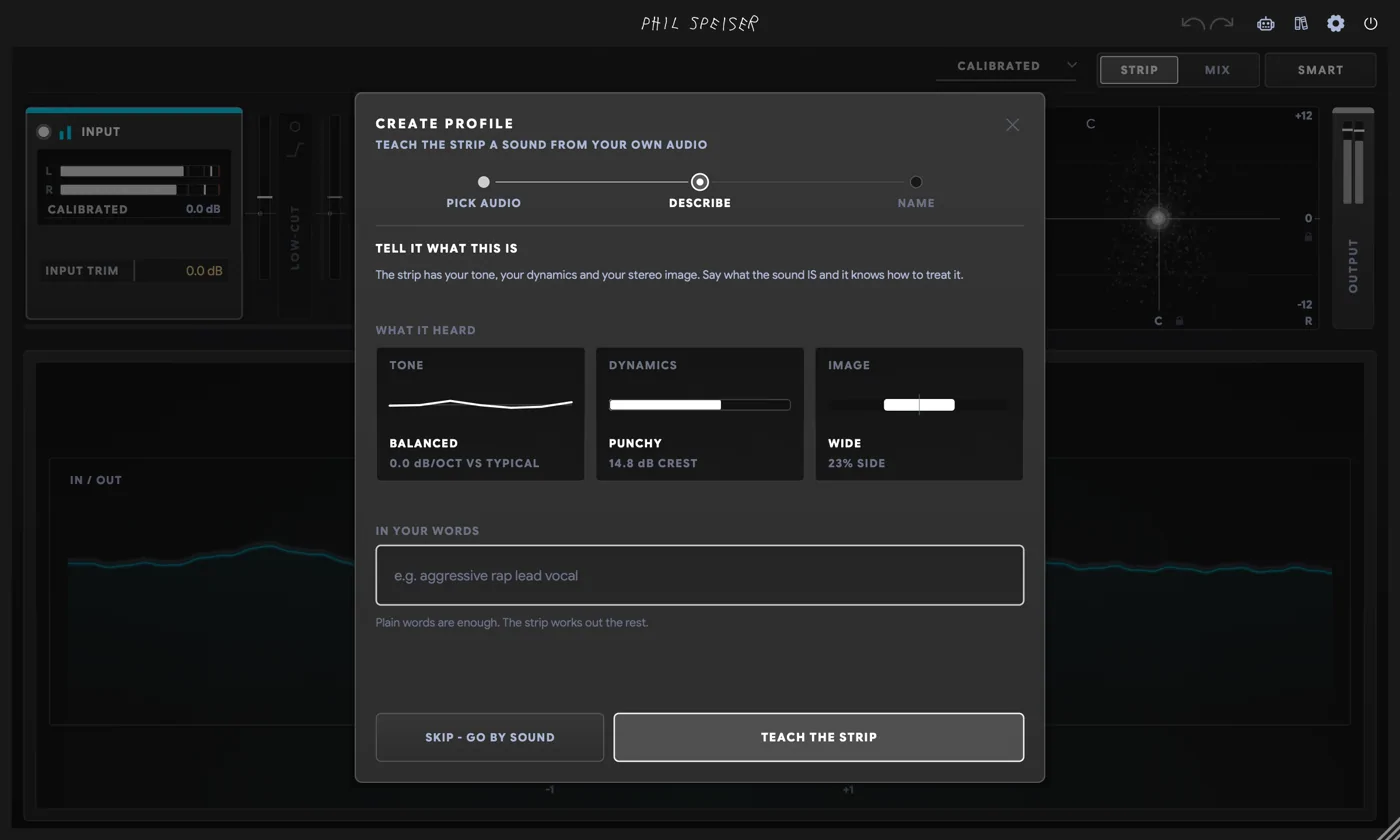
Then say what the sound is. The strip shows what it heard — tone, dynamics, image — and you add the intent in plain words. Mine: mix bus RNB. Name it, and it's on every instance, in every session.
Why Does My New Profile Land in the Wrong Place?
After I picked R&B MIX BUS, the master card hadn't moved to the master position. I'd fed it an instrumental and called it R&B, so the strip read it as a 2-TRACK INSTRUMENTAL — a beat a vocal sits on. Right for a beat, wrong for a master.
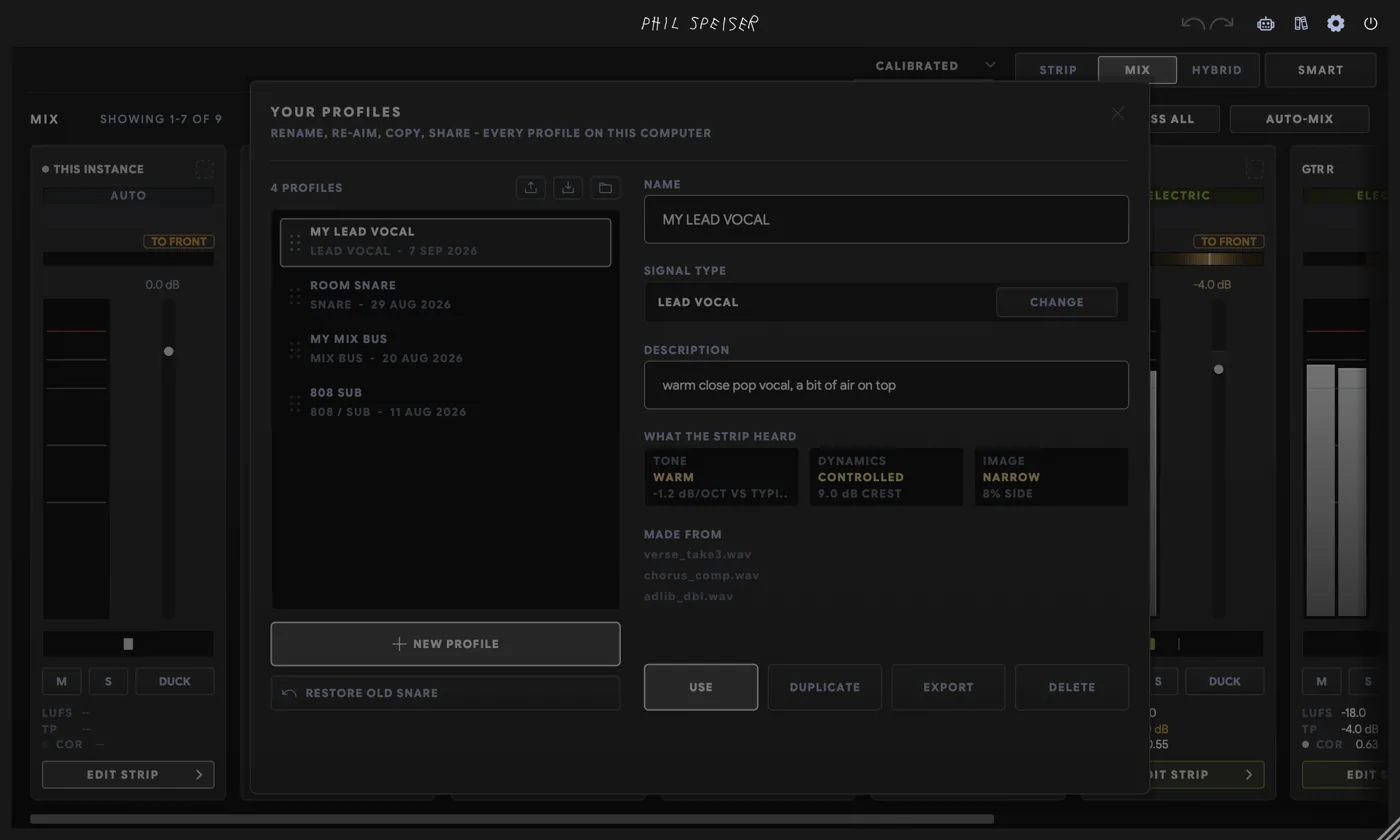
MANAGE, then CHANGE, then MIX BUS. The measurement stays; only the job changes. The master now sits with the buses as R&B MIX BUS.
Then Press AUTO-MIX
Now every level, pan and carve lands on the right track — the lead in the centre, backings wide, sections moving as one. THE_STRIP 3 walks you through every decision in plain words, and one undo takes back the whole run.
Your 60-Second Profile Checklist
- THE_STRIP 3 on every track and the master, then M.
- Walk the type chips and confirm them.
- No matching name? Type the instrument.
- Missing your sound? + CREATE PROFILE from files or THE_BRIDGE.
- Check the profile's job in MANAGE.
- AUTO-MIX.
The strip does the heavy lifting. You keep the one thing it can't know without you: what your song is supposed to be.
FAQ
What is a profile in THE_STRIP 3?
A profile tells THE_STRIP 3 what a track is and what job it has in the mix: LEAD VOCAL, BACKING VOCALS (MALE), KICK DRUM, 808, PAD, INSTRUMENTAL (R&B & SOUL), MIX BUS and so on. THE_STRIP 3 ships with 81 factory profiles in categories from VOICE and DRUMS to 2-TRACK and MIX, and you can build your own from reference audio.
Why do profiles matter so much for THE_STRIP 3's AUTO-MIX?
Because every AUTO-MIX decision starts from them. The profile decides how SMART SETUP configures the strip, which family group the track joins, its place in the UNMASK pecking order, whether it's a track, a bus or the master, whether it stays centred or goes wide on the stage spread, and how it's levelled against its section and stem. A vocoder tagged as VOCAL CHOPS gets mixed with the synths; tagged as BACKING VOCALS, it goes wide and sits behind the lead.
What if THE_STRIP 3 has no profile for my instrument?
Type the instrument's name in SMART SETUP or the mixer's type picker. When no profile matches by name, THE_STRIP 3 offers the closest fits: 'vocoder' suggests VOCAL CHOPS and both BACKING VOCALS, 'ukulele' the two ACOUSTIC GTR profiles, 'harp' nylon guitar, mallets, picked acoustic and pad, 'juno' or 'serum' the synth families. Instrument words in German, French, Spanish, Italian and Portuguese work too.
How do I create a custom profile in THE_STRIP 3?
Choose + CREATE PROFILE in SMART SETUP or the mixer's type picker, drop in up to eight reference files (WAV, AIFF, FLAC, MP3 or OGG) or record one with the free THE_BRIDGE app, optionally describe the sound in words, and name it. The profile is saved machine-wide, so every instance of THE_STRIP 3 in every session can use it.
Can THE_STRIP 3 capture a reference track that's playing on my computer?
Yes, through THE_BRIDGE, my free companion app for macOS and Windows. Its RECORD tab captures the mic or SYSTEM AUDIO, meaning whatever the computer plays in any app, with no routing. THE_STRIP 3's CREATE PROFILE can start that recording from inside the DAW and picks up the file when it's done. SYSTEM AUDIO on macOS needs macOS 14.2 or newer.
Why did my custom profile land in the wrong place in THE_STRIP 3's mixer?
THE_STRIP 3 interprets a new profile from its audio and your description. A reference that's a full instrumental can be read as a 2-TRACK INSTRUMENTAL profile, which is a track that sits under a vocal, not a master. Open MANAGE on YOUR PROFILES and use CHANGE to set the right type, such as MIX BUS. The measurement is kept, so nothing needs re-analysing, and the card moves right of the split rule with the buses and master.
Can I share THE_STRIP 3 profiles or move them to another computer?
Yes. In MANAGE you can EXPORT one profile or EXPORT ALL to a .stripprofiles bundle, and IMPORT a bundle by dropping it on the library. An imported profile with the same identity updates in place; a name clash is kept under a new name and never overwrites anything.