
THE_LAB
Find out what your plugins really do
Drop in any plugin and THE_LAB tells you, in plain words, what it does to your sound and whether you can trust it in a session. Then it shows you the measurement behind every line. No DAW needed. And it’s free.
100% free · macOS & Windows
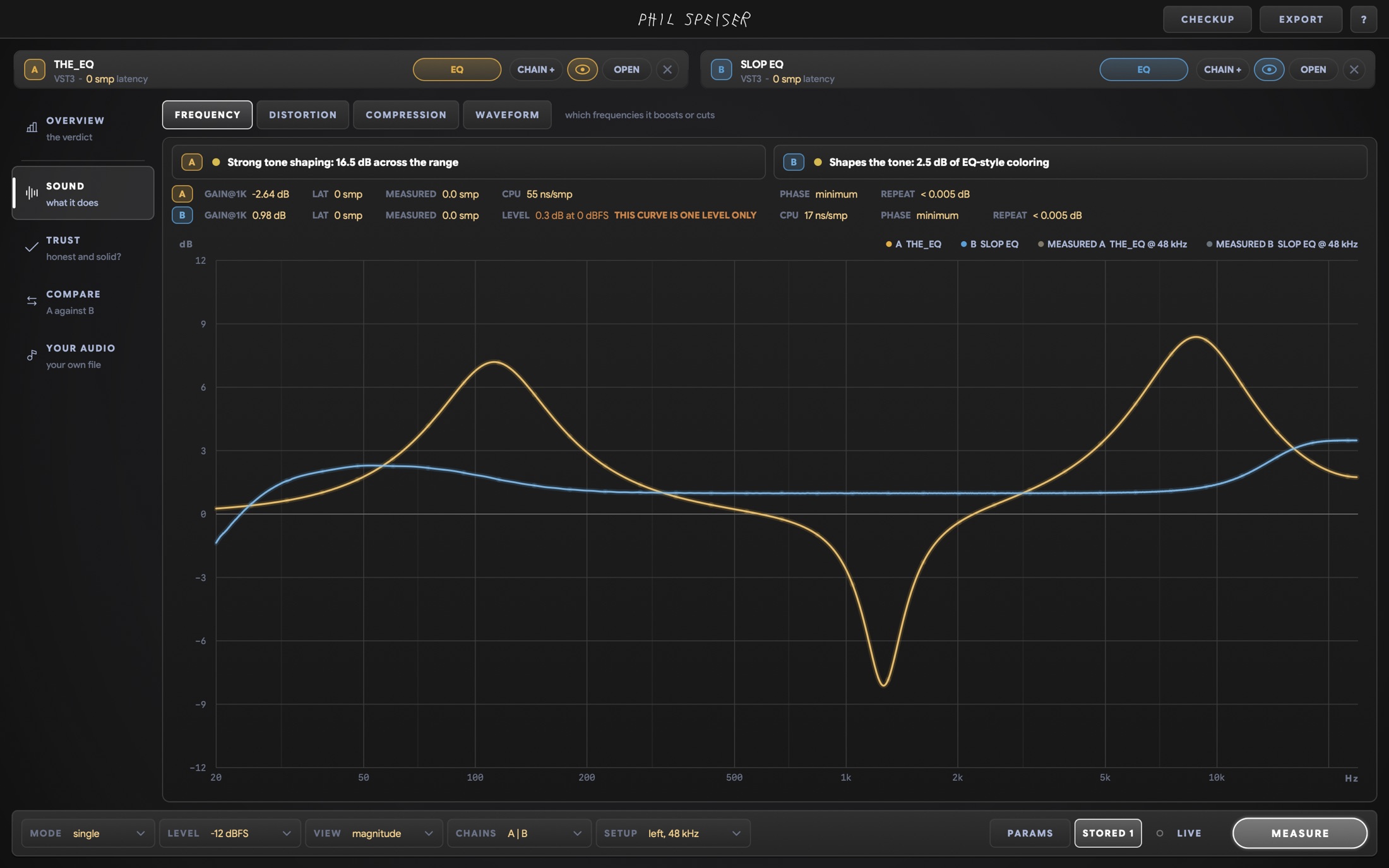
Two EQs on the same signal. What each one really does to the tone, drawn over each other.
See what it does to your sound.
Load two plugins and every chart draws both. The curve it really makes, the harmonics it adds, the digital junk it shouldn’t, the point where it starts to compress and how hard. Each chart opens with one line that says what you’re looking at.
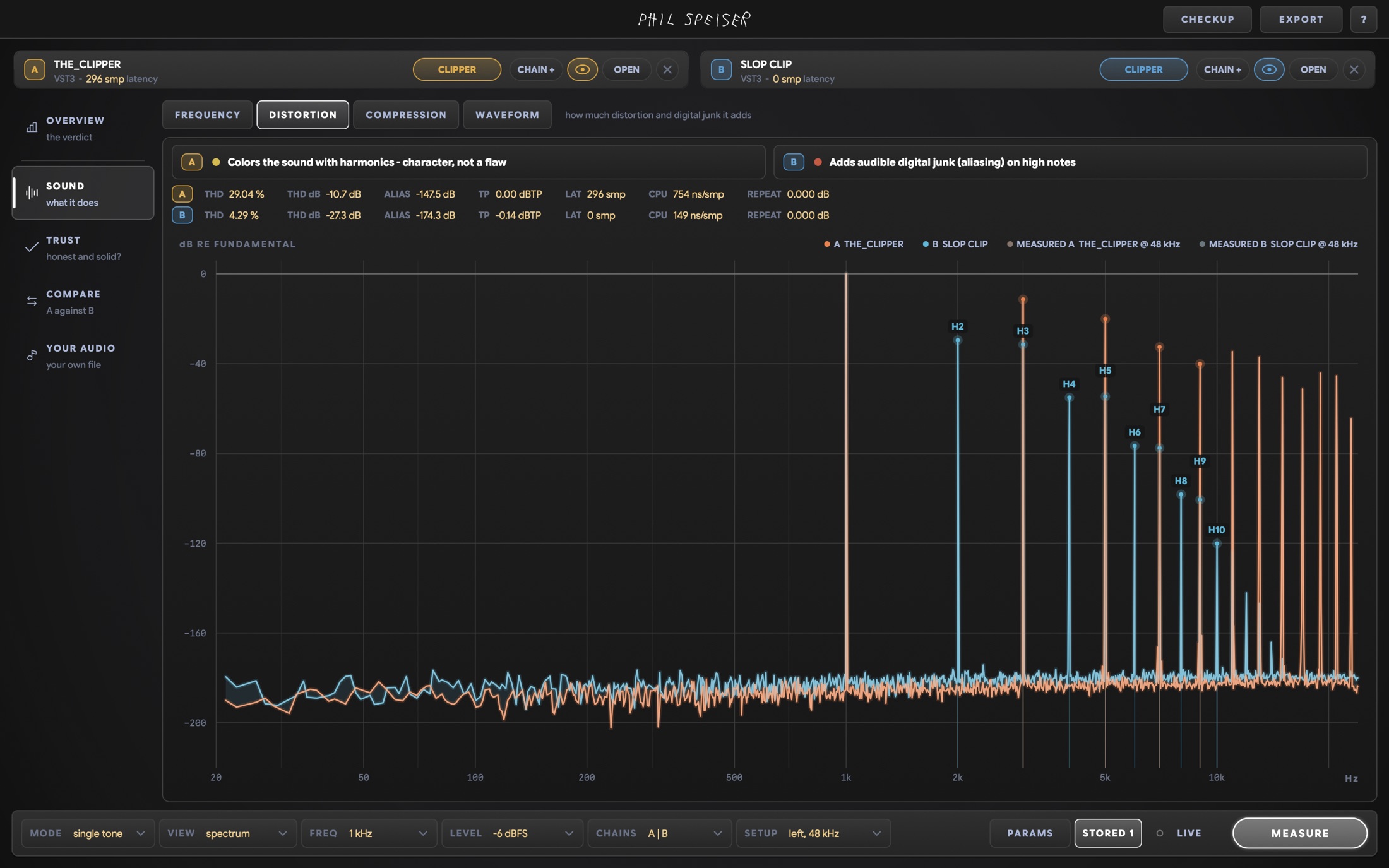
DISTORTION: two clippers, one tone. Every harmonic, and what doesn’t belong.
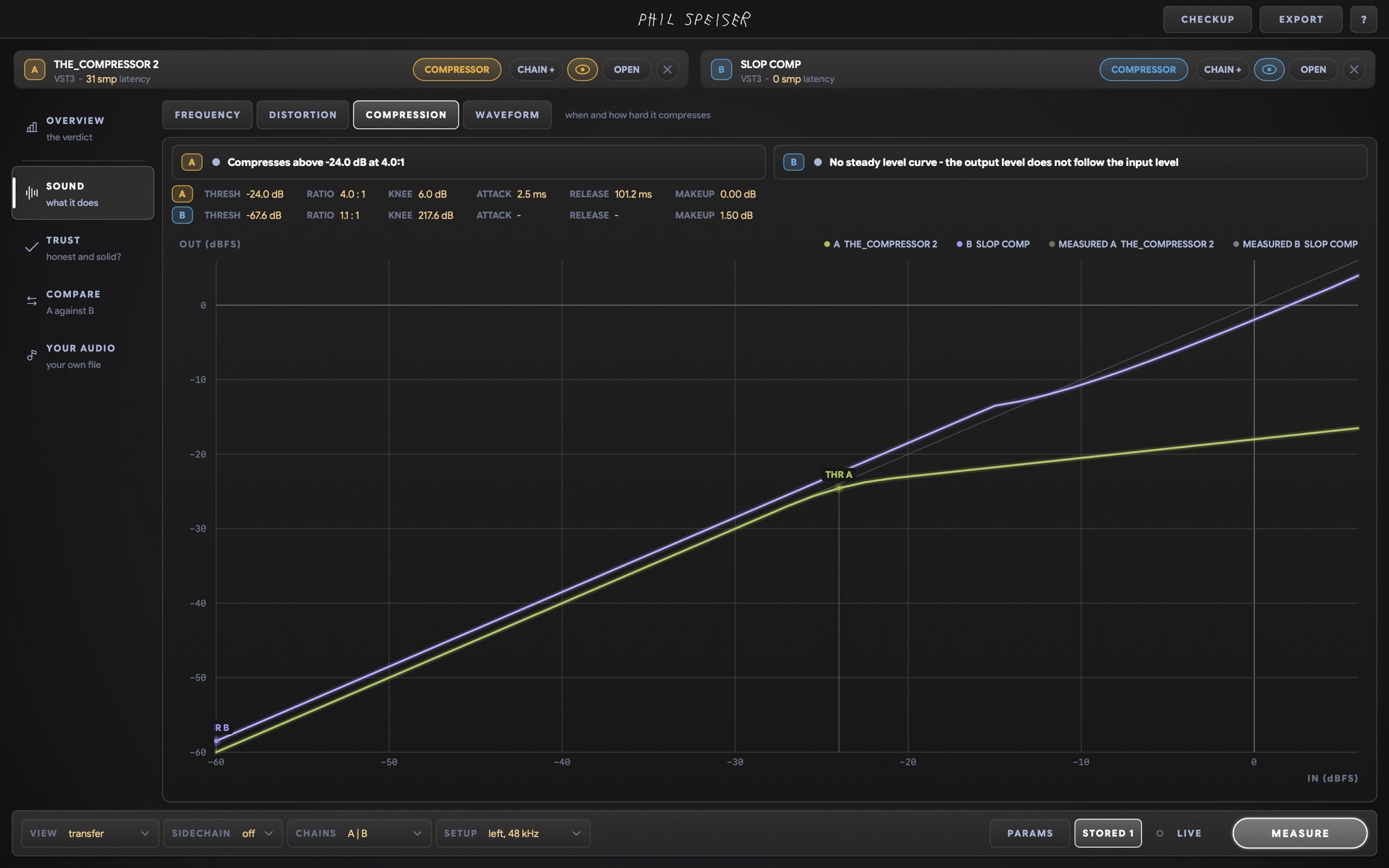
COMPRESSION: where it starts, how hard it goes, attack and release, read from the plugin itself.
Why do I need THE_LAB?
Every plugin page says “clean”, “transparent” and “analog”. Your ears can tell you a lot. They can’t tell you that a plugin sounds different in the bounce than it did in playback, or that it’s quietly pushing your track out of time.
I build my plugins myself, and I needed a way to check them harder than any customer would.
So I built the test bench I wanted.
Every plugin I release goes through it. Now you can put anything you own through the same tests. Mine included.
One verdict. Four questions.
Load a plugin and a quick checkup runs by itself. The full CHECKUP is one click. Everything else is sorted by the question you actually have.
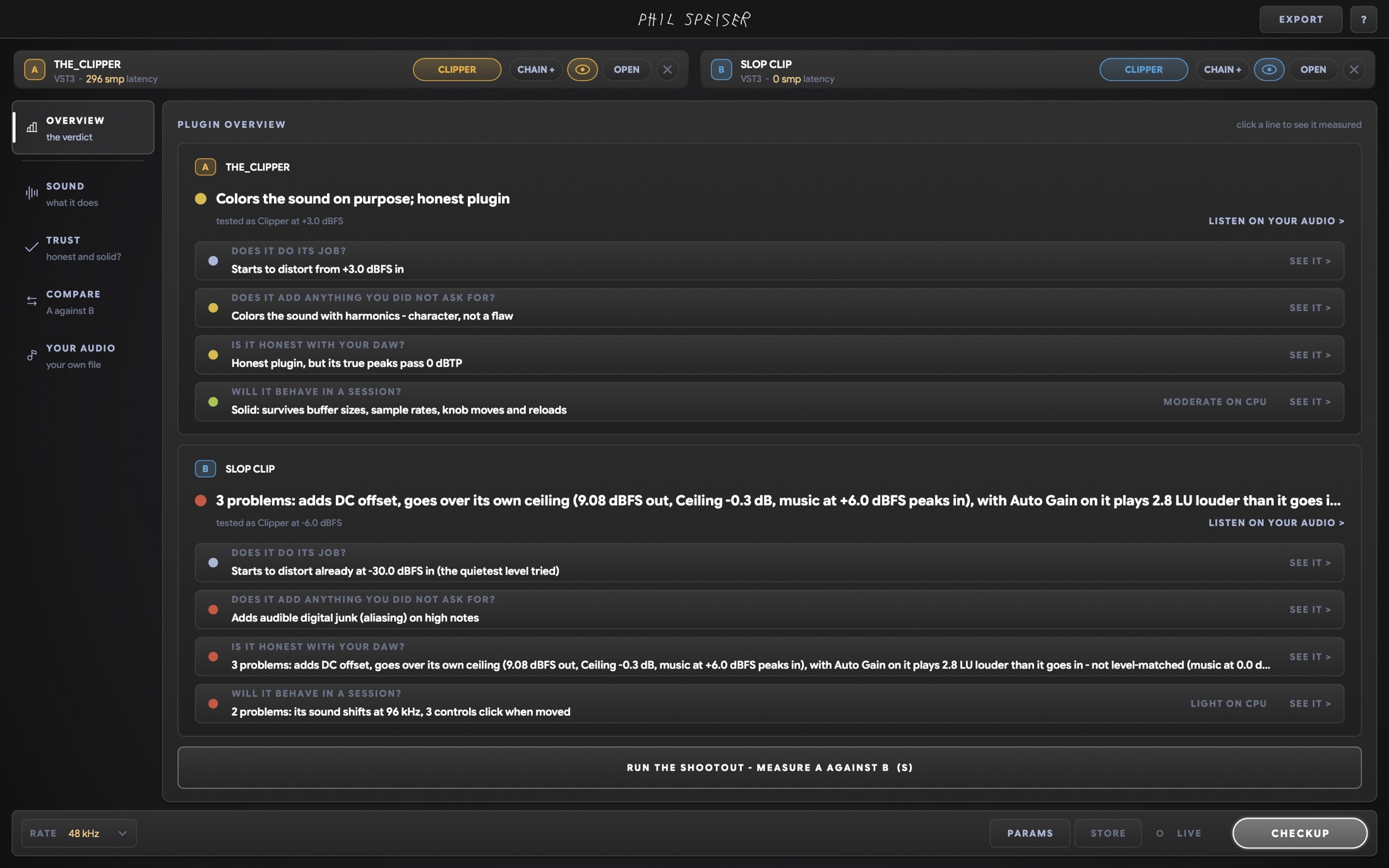
A real checkup of two clippers. SLOP CLIP is a deliberately bad plugin I built to make sure the tests catch what they should.
OVERVIEW
The verdict
One card per plugin, four answers in plain words: does it do its job, does it add anything you did not ask for, is it honest with your DAW, will it behave in a session. Click any line to see it measured.
SOUND
What does it do?
Which frequencies it boosts or cuts, how much distortion and digital junk (aliasing) it adds, when and how hard it compresses, and the shape of the wave coming out.
TRUST
Honest and solid?
Does it tell your DAW the truth about its delay and its bypass? Does it survive other buffer sizes, sample rates, knob moves and a reopened session? Is it built properly, and what does it cost your CPU?
COMPARE
A against B
Two plugins on the same signal. Hear and see what is left when one is taken from the other, then run the shootout: every count side by side, with a line that says who is ahead and by how much.
YOUR AUDIO
Your own file
Your loop, mix or vocal through the plugin: before and after, what it added, the spectrum, and for vocals the pitch it corrected.
Find the problem before your session does.
The worst plugin problems don’t show up in a demo. They show up at the bounce, or when you reopen the project a month later. THE_LAB goes looking for them on purpose.
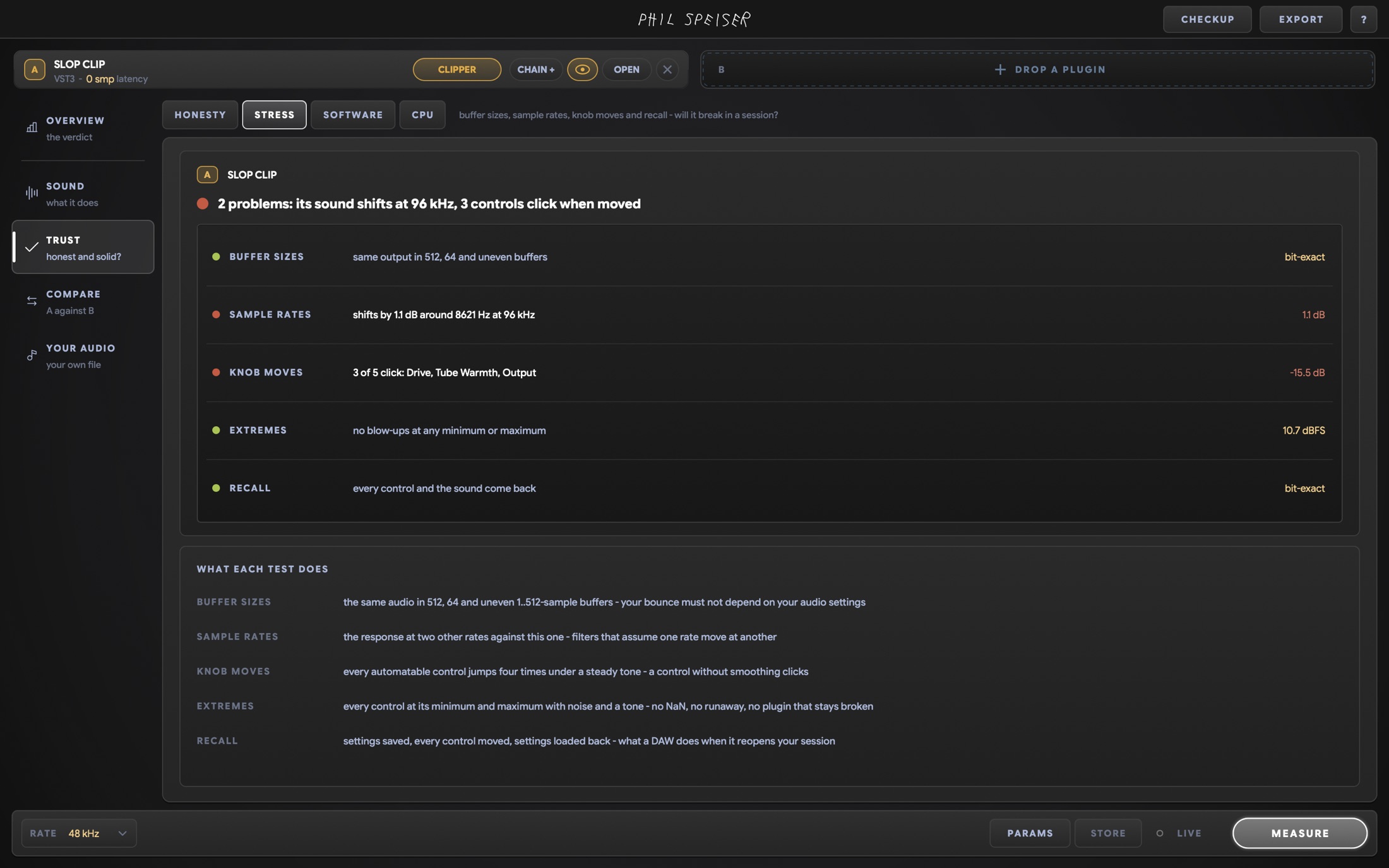
STRESS on the deliberately bad clipper: its sound shifts at 96 kHz and three controls click.
Your bounce matches what you heard
The same audio at different buffer sizes and sample rates. If the sound moves with your audio settings, you see where and by how much.
Nothing clicks when you automate it
Every control gets moved while audio plays. The ones that click are listed by name.
Your session reopens the way you left it
Settings saved, everything moved, settings loaded back, plus a fresh copy that loads them, the way a DAW reopens a project.
It tells your DAW the truth
The delay it reports against the delay it really has, a bypass that is a real bypass, flipped polarity, hiss on silence, output over its own ceiling.
Are they really different?
Two plugins, the same signal, one run. You get the numbers side by side, what is left when they cancel, and you can listen to A, B and the difference.
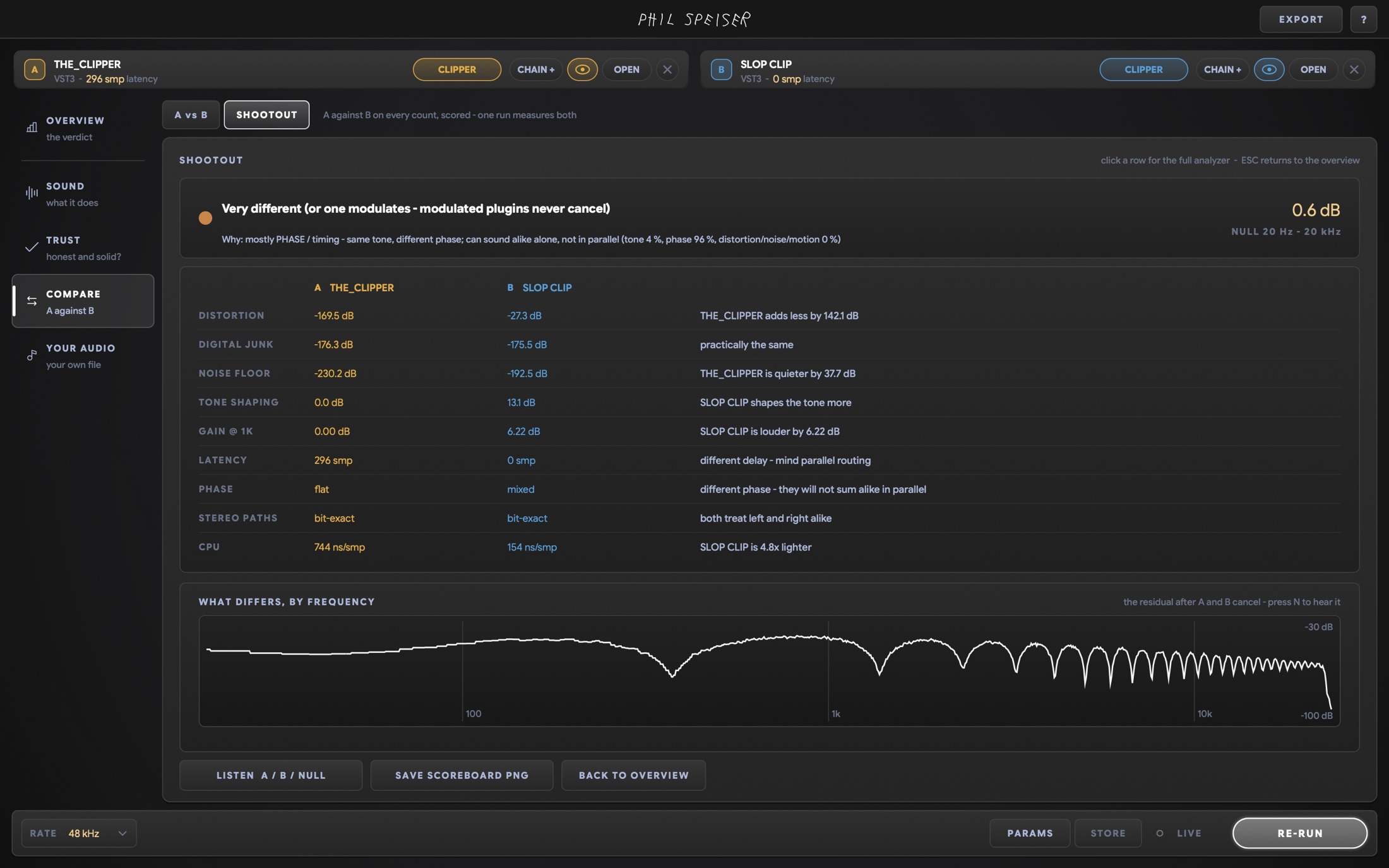
The shootout. It also says when a comparison is not a fair one.
Go deeper when you want to.
Tested as what it is
A clipper gets driven into clipping. A compressor is tested around its own threshold. THE_LAB suggests one of eight plugin types when you load something, and you can change it with one click. Instruments get played notes.
LIVE
Switch LIVE on, open the plugin and turn a knob. The chart follows while you move it. The parameter panel beside the chart can also sweep one control and draw what it really does.
Chains and hardware
Stack several plugins in one slot and measure the whole chain. Or put a piece of outboard gear in a slot through your audio interface.
Share it
Save any result as a picture (16:9, square or vertical), a short reveal video, or the raw numbers as CSV / JSON. COPY FOR AI puts the full report on your clipboard, ready to paste into an AI assistant for a plain-language read.
What you need
- macOS 10.13 or newer, or Windows (64-bit)
- Loads VST3 plugins, and Audio Units on the Mac
- A standalone app. No DAW needed.
- Free. On first start it asks for the email of your philspeiser.com account, which is free too.
What it can’t do
- It can’t tell you whether a plugin sounds good. That stays with your ears. A plugin you love can fail a test here and still be the right one for the song.
- The SOFTWARE test that watches how a plugin behaves while it plays runs on the Mac only.
- Found a verdict you think is wrong? Write me. I answer support myself, and a wrong verdict is a bug I want to fix.
Want to see what THE_LAB reveals? Read how I used it to prove clipping is saturation — and why a clean clipper still beats a saturator — with measured, reproducible numbers. Or see how I used it to expose AI slop plugins.
Questions about THE_LAB
Is there a free app to test audio plugins?
+
Yes. THE_LAB is a free standalone app for macOS and Windows that tests any VST3 plugin, plus Audio Units on the Mac. Load a plugin and it tells you in plain words what it does to your sound, whether it is honest with your DAW and whether it survives a real session, with the measurement behind every line.
How can I tell if a plugin is badly made or AI slop?
+
Run it through THE_LAB. Its CHECKUP checks whether the plugin does what its controls say, adds distortion or aliasing you did not ask for, reports its latency and bypass honestly, and sounds the same at other buffer sizes and sample rates. When I tested vibe-coded plugins this way, one EQ set to +6 dB at 300 Hz really boosted about 7 dB at 320 Hz, and its boost moved to around 600 Hz at 96 kHz.
Can THE_LAB compare two plugins?
+
Yes. Load two plugins and THE_LAB runs both through the same tests with the same signal, draws both on every chart, lets you hear A, B and the difference, and runs a shootout that says who is ahead on each measurement and by how much.
Can THE_LAB measure aliasing, THD and latency?
+
Yes. THE_LAB measures frequency response, harmonic distortion (THD), aliasing, true peak, reported and real latency, phase, compression curves with attack and release, noise floor and CPU use. Every result can be exported as a picture, a short video, CSV or JSON.
Can I ask ChatGPT about a plugin with THE_LAB?
+
Yes. In THE_LAB, EXPORT then COPY FOR AI puts the full measurement report and a ready prompt on your clipboard. Paste it into ChatGPT or any AI assistant to get a plain-language read of what the plugin does to your sound.
Does THE_LAB need a DAW?
+
No. THE_LAB is a standalone app. It hosts the plugin itself, so you can test plugins without opening a DAW. It runs on macOS 10.13 or newer and on 64-bit Windows.
Is THE_LAB really free?
+
Yes. THE_LAB is free. On first start it asks for the email of your philspeiser.com account, which is free too.
Put your plugins on the bench.
Download THE_LAB free, drop one in and read the verdict.
100% free · macOS & Windows