How to Expose AI Slop Plugins (For Free)
I bought a bunch of vibe-coded plugins and put them through the same tests I run on my own. One EQ boosts a different frequency than the one you dial in, a clipper fills your track with junk, and every one of them slowly eats your memory. Here's how to check any plugin yourself with THE_LAB, my free test bench, before it touches your music.
I bought a bunch of vibe-coded plugins and tested them the way I test my own.
One EQ boosts a different frequency than the one you dial in. And every single one of them slowly eats your computer's memory until your session crashes.
What Is an AI Slop Plugin?
An AI slop plugin is an audio plugin generated quickly with AI ("vibe-coded") and sold without the engineering real-time audio needs. It looks fine in a demo. Measure it, and you find settings it doesn't honour, sound it adds without asking, and code that gets unstable in a real session.
I don't hate vibe coding. Lower barriers mean more people with great ideas can build things. But audio runs in real time, so sloppy code gets unstable fast. And sloppy processing adds up until you hear it in your final record.
So I turned my internal test suite into a free app: THE_LAB.
How Can I Test a Plugin for Free?
Drop it into a slot. THE_LAB recognises what it is and runs the tests for that type. Put a plugin you trust in the other slot, and both get the same tests with the same signal.
I didn't want to expose anyone, so every plugin I bought got a new name and skin. The sound is untouched: same processing, same problems.
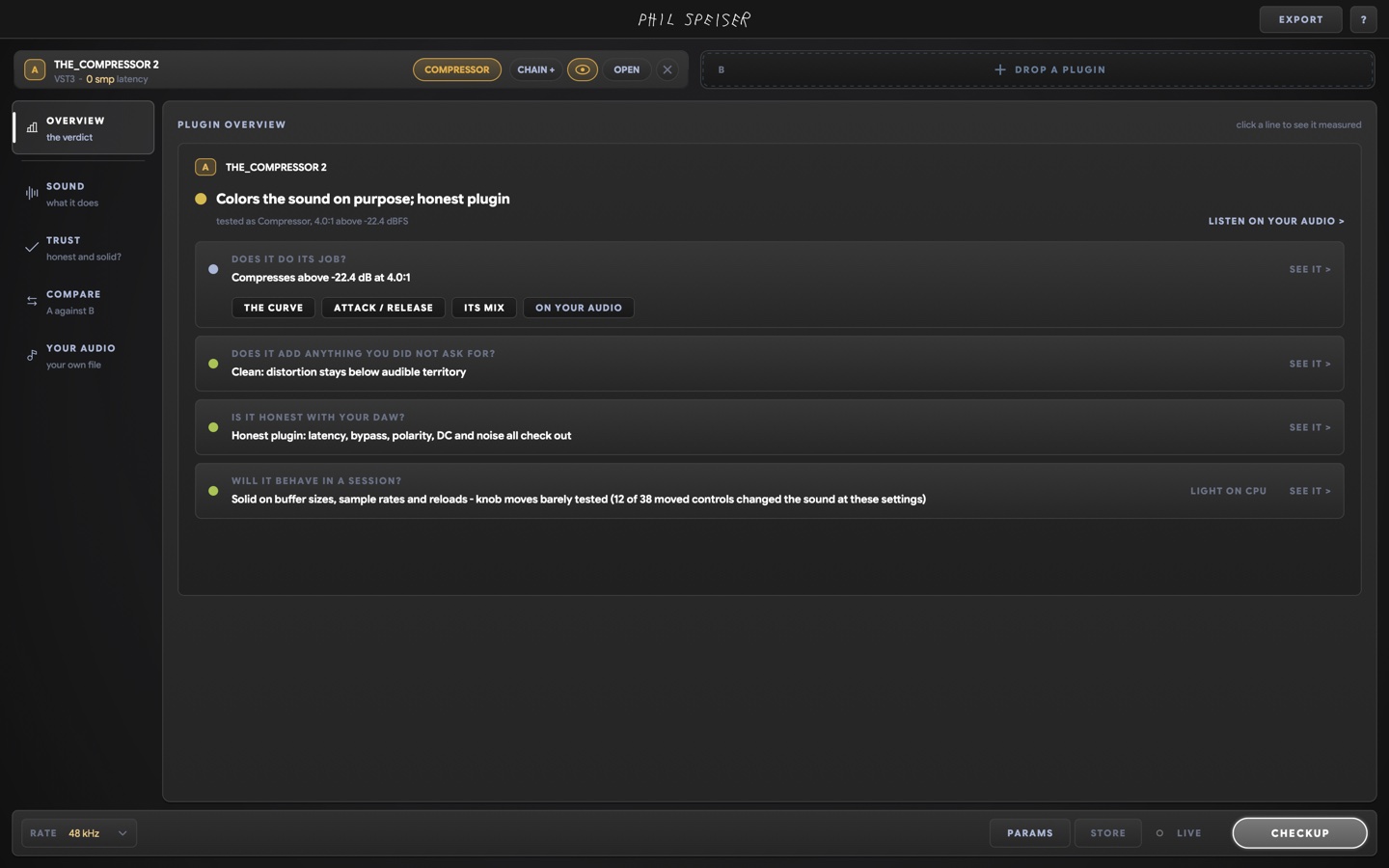
CHECKUP runs the stress tests too: it moves every control and tries to break the plugin. This is what an honest compressor looks like. Next to it, SLOP COMP lit up red, because it lies to your DAW about a lot of things.
Don't Want to Read Graphs?
EXPORT, then COPY FOR AI. The full report and the prompt land on your clipboard. I pasted it into a temporary ChatGPT chat, so it had no idea I made one of the plugins. Then you can ask anything: is it good, what will it do to my sound?
Does the EQ Boost What You Dial In?
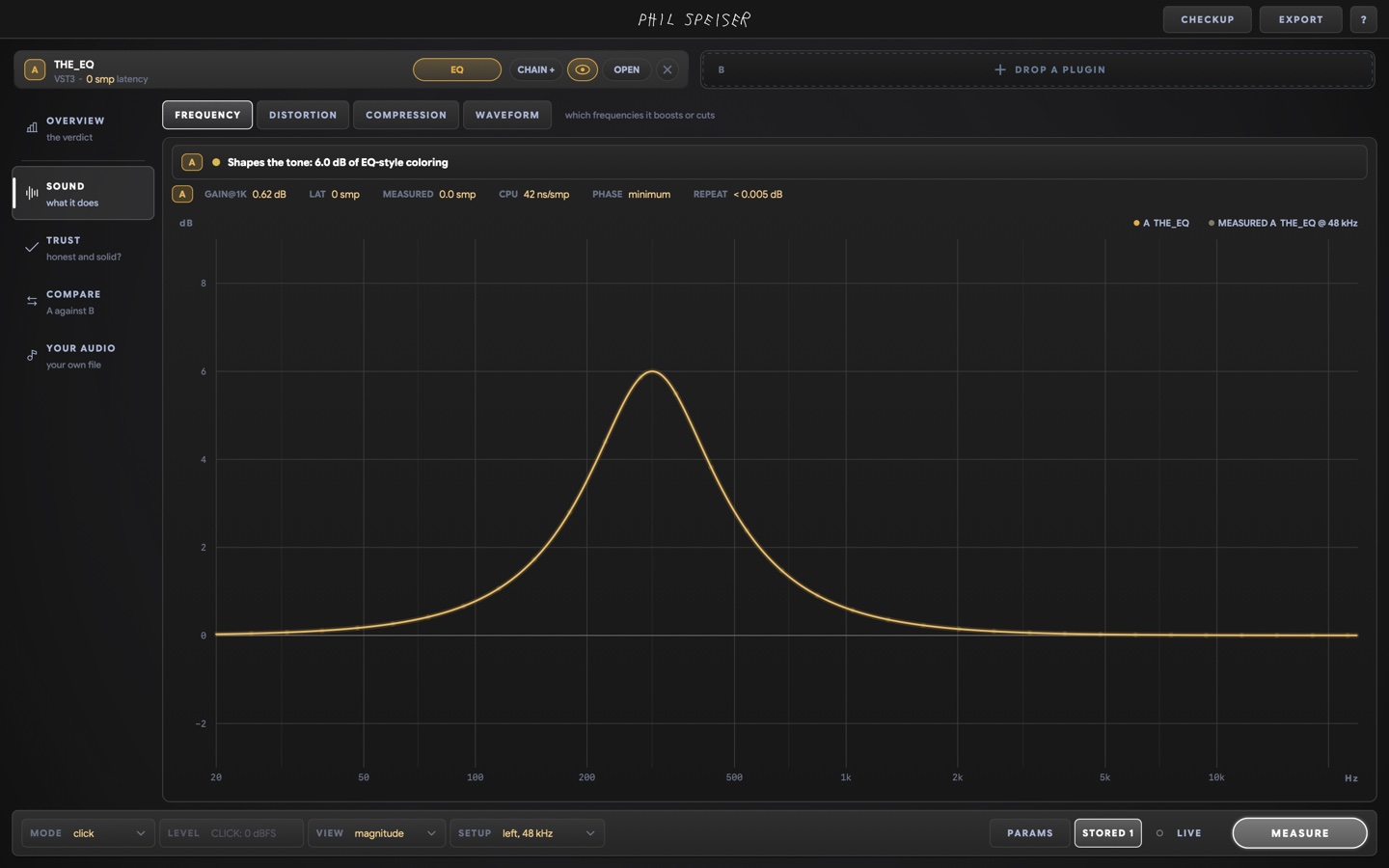
+6 dB at 300 Hz on both EQs.
Mine puts the bump exactly there. SLOP EQ gave me 320 Hz and 7 dB. Then I switched the sample rate, and the bump jumped somewhere completely different.
Its filters never recalculate for the sample rate. Mix at 44.1 kHz, export at 96 kHz, and you'd get a 600 Hz boost you never dialed in. Your mix sounds different, and you'd never know why.
What Is the Clipper Adding to Your Sound?
18 dB of drive, 16x oversampling on both, so it's a fair fight.
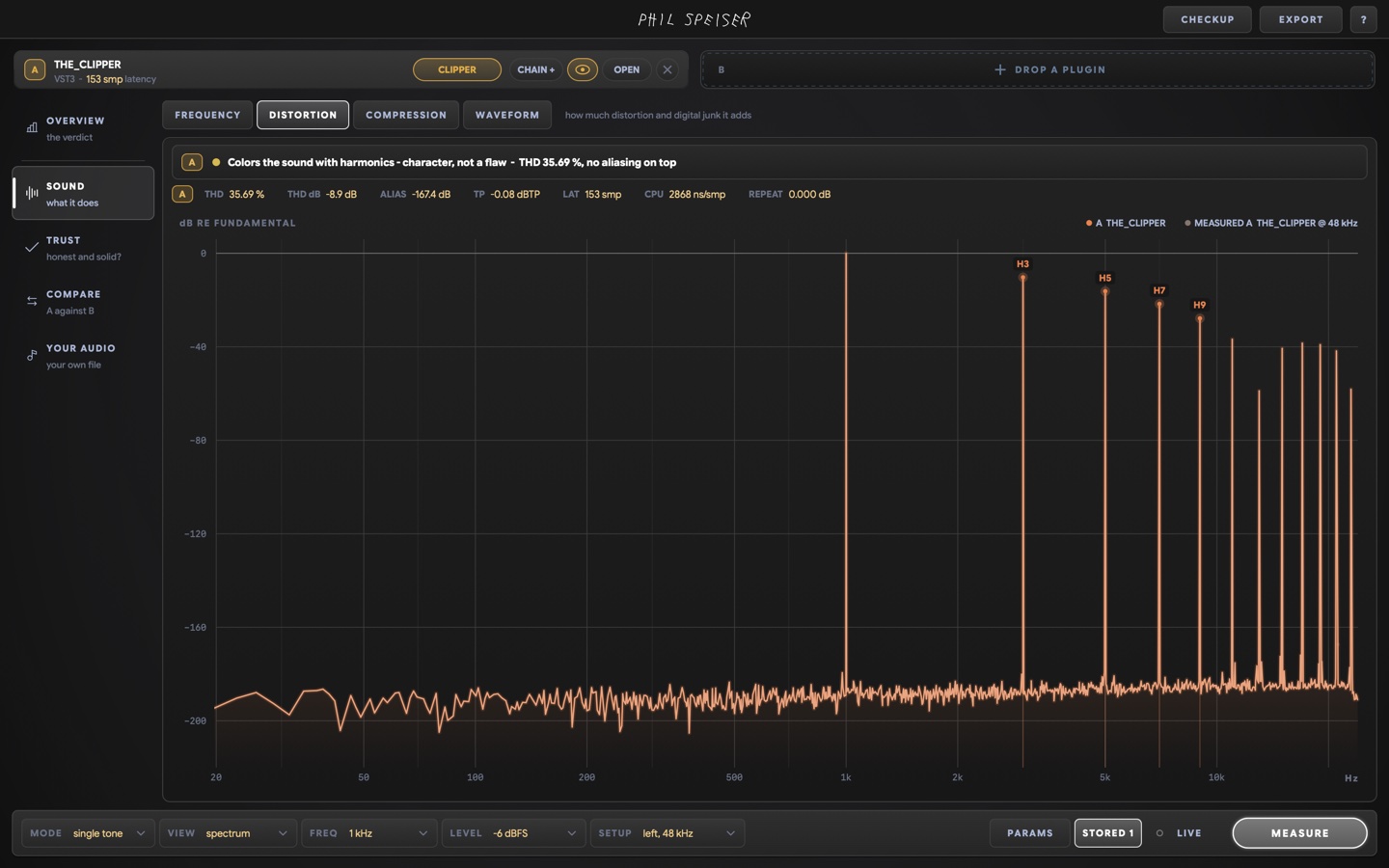
Clean harmonics are the job. The junk (aliasing) sits below -160 dB: nobody will ever hear it, and it doesn't add up across instances (here's why that matters for a clipper). SLOP CLIP was full of harmonics and junk nobody asked for. Use a few of those and you're harming the music you worked hard on.
There was a free clipper too. Its creator said it took one prompt and four minutes, and that it beat a famous analog-modelled clipper in blind tests. Under the hood: about four lines of basic maths inside stock oversampling that always runs every stage, so you pay the CPU of more than 32x for at most 16x. Plus a background image of around 28 MB that every instance loads into RAM. It's bloatware, and your DAW's stock clipper is the better choice.
Does the Resonance Suppressor Find the Resonances?
THE_LAB's test signal has four planted resonances.
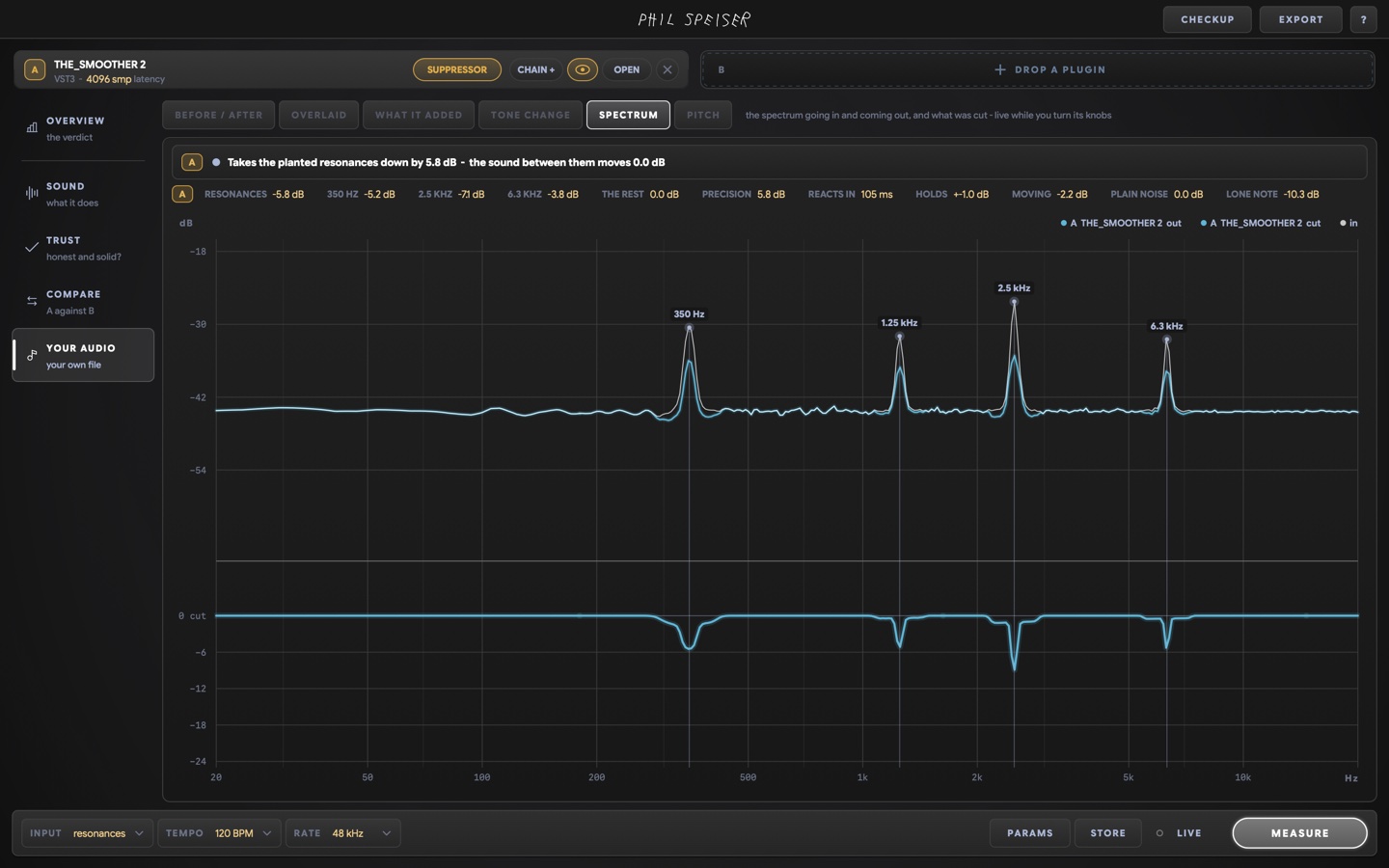
THE_SMOOTHER 2 picks each one up and takes it down, and the sound between them moves 0.0 dB. SLOP SMOOTH barely reacted. It caught the highest peak and pulled everything down around it. If a plugin doesn't do the job you bought it for, it's worthless.
What Did Each Slop Plugin Get Wrong?
| What I tested | What THE_LAB showed |
|---|---|
| SLOP COMP | Lies to your DAW in its reporting |
| SLOP EQ | +6 dB at 300 Hz really boosts ~7 dB at 320 Hz, and moves to ~600 Hz at 96 kHz |
| SLOP CLIP | Harmonics and digital junk you didn't ask for |
| Free "one-prompt" clipper | Basic maths, CPU of more than 32x for at most 16x, ~28 MB image in RAM |
| SLOP SMOOTH | Barely tracks resonances; broad cuts instead |
| All of them | Memory keeps growing until the session crashes |
The Problem You Won't Hear in a Demo
Basically all of them leak memory. You won't notice while trying one out. Take it into a real production and it's the plugin that crashes your session, because nobody planned for what happens after the first prompt.
Get THE_LAB for free, for macOS and Windows. Load any plugin, press CHECKUP, read the verdict. Mine included.
Test the well-known ones too. Maybe some paid plugins from big companies are tricking you a little. And if you find a really nasty slop plugin that shouldn't be for sale, tell me privately.
How I measured this
- Material
- THE_LAB's own test signals: sine tones, clicks and a noise signal with four planted resonances (350 Hz, 1.25 kHz, 2.5 kHz, 6.3 kHz)
- Versions
- THE_LAB 1.3. Each bought plugin was rebuilt under a SLOP name with identical processing; my plugins as released
- Measured on
- 2026-11
- Settings
- Compressors: -24 dB threshold on both, full CHECKUP including the stress tests
- EQs: +6 dB at 300 Hz on both, measured at 48 kHz and again at a higher sample rate
- Clippers: 18 dB of drive and 16x oversampling on both
- Held constant
- The same signal, level and sample rate for both slots in every comparison
FAQ
What is an AI slop plugin?
A plugin that was generated quickly with AI and released without the engineering that real-time audio needs. In my tests in THE_LAB that showed up as an EQ whose frequencies drift with the sample rate, a clipper that adds harmonics and junk you didn't ask for, a resonance suppressor that barely tracks resonances, wasted CPU, and memory that keeps growing until a session crashes.
How can I test whether a plugin is any good for free?
Download THE_LAB, my free plugin test bench for macOS and Windows. Load the plugin, press CHECKUP, and it tells you in plain words whether the plugin does its job, adds anything you didn't ask for, is honest with your DAW and survives a real session, with the measurement behind every line.
Why does an EQ boost the wrong frequency at a different sample rate?
Because its filters were calculated for one sample rate and never recalculated. In THE_LAB, a vibe-coded EQ set to +6 dB at 300 Hz boosted about 7 dB at 320 Hz, and at 96 kHz the bump moved to around 600 Hz. You'd mix at 44.1 kHz, export at 96 kHz and get a boost you never dialed in.
Can I ask ChatGPT whether a plugin is good?
Yes, with THE_LAB's measurements. EXPORT, then COPY FOR AI copies the full report with a prompt included. Paste it into ChatGPT or another assistant and it can tell you what the plugin does to your sound, where it's strong and where it falls short, based on the numbers instead of marketing copy.
Did you name the plugins you tested?
No. I didn't want to expose any person or company, so I rebuilt each plugin's sound under a new name and skin (SLOP COMP, SLOP EQ, SLOP CLIP, SLOP SMOOTH). The processing is identical to the original, so every result in the video and in this post is what the original plugin does.
Can THE_LAB test plugins from well-known companies too?
Yes. THE_LAB loads any VST3 plugin, plus Audio Units on the Mac, from any developer, including mine. It's a standalone app, so no DAW is needed.