From THE_PATTERN to THE_PATTERN 2: Why I Rebuilt My Drum Plugin From Scratch
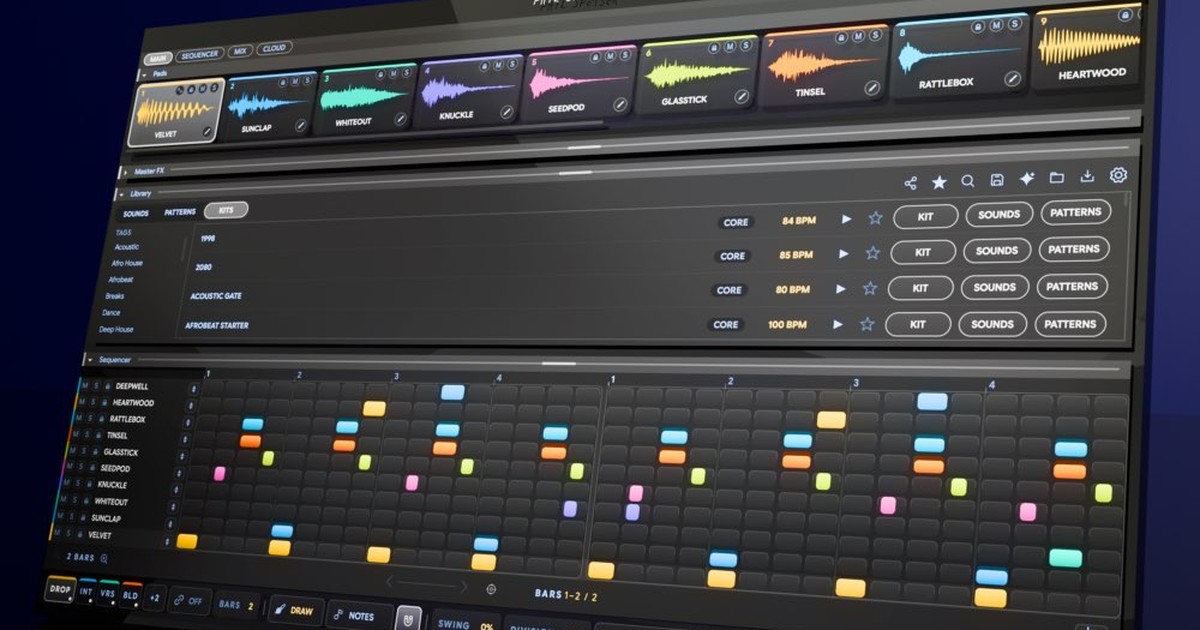
THE_PATTERN (2022) gave you six drum lanes and four-bar loops. THE_PATTERN 2 (October 2026) is a rebuild from a blank page: 16 pads, patterns up to 16 bars in any time signature, a kick synth, loops turned into patterns and grooves turned into whole songs. What changed, what was hard, and how I tested it.
In December 2022 I released THE_PATTERN and called it "the drum sequencer of the future."
In October 2026 I released THE_PATTERN 2. The first line on its page reads "THE DRUM MACHINE FROM THE FUTURE."
Same promise. A completely different plugin.
THE_PATTERN 2 is not an update. I rebuilt it from a blank page.
So if you read about THE_PATTERN anywhere before October 2026, including what it couldn't do, you read about version 1. This is the whole story: what the first one was, where it hit its limits, what was hard about building the second one, and exactly what changed.
What was THE_PATTERN (2022)?
THE_PATTERN was the first big plugin I built after THE_INSTRUMENT. The idea was simple: the right drums for your song, always just a few clicks away.
It gave you six lanes: kick, snare, clap, hat and two percussion lanes. Each lane held one sample and one pattern. You clicked through sounds and grooves, locked the ones you liked, and kept going until the beat felt right.
Every lane had its own delay, lo-fi, reverb, auto-pan and transpose. Every sample arrived at the same level. And you could drag any lane's MIDI into your DAW, or export the whole beat as stems.
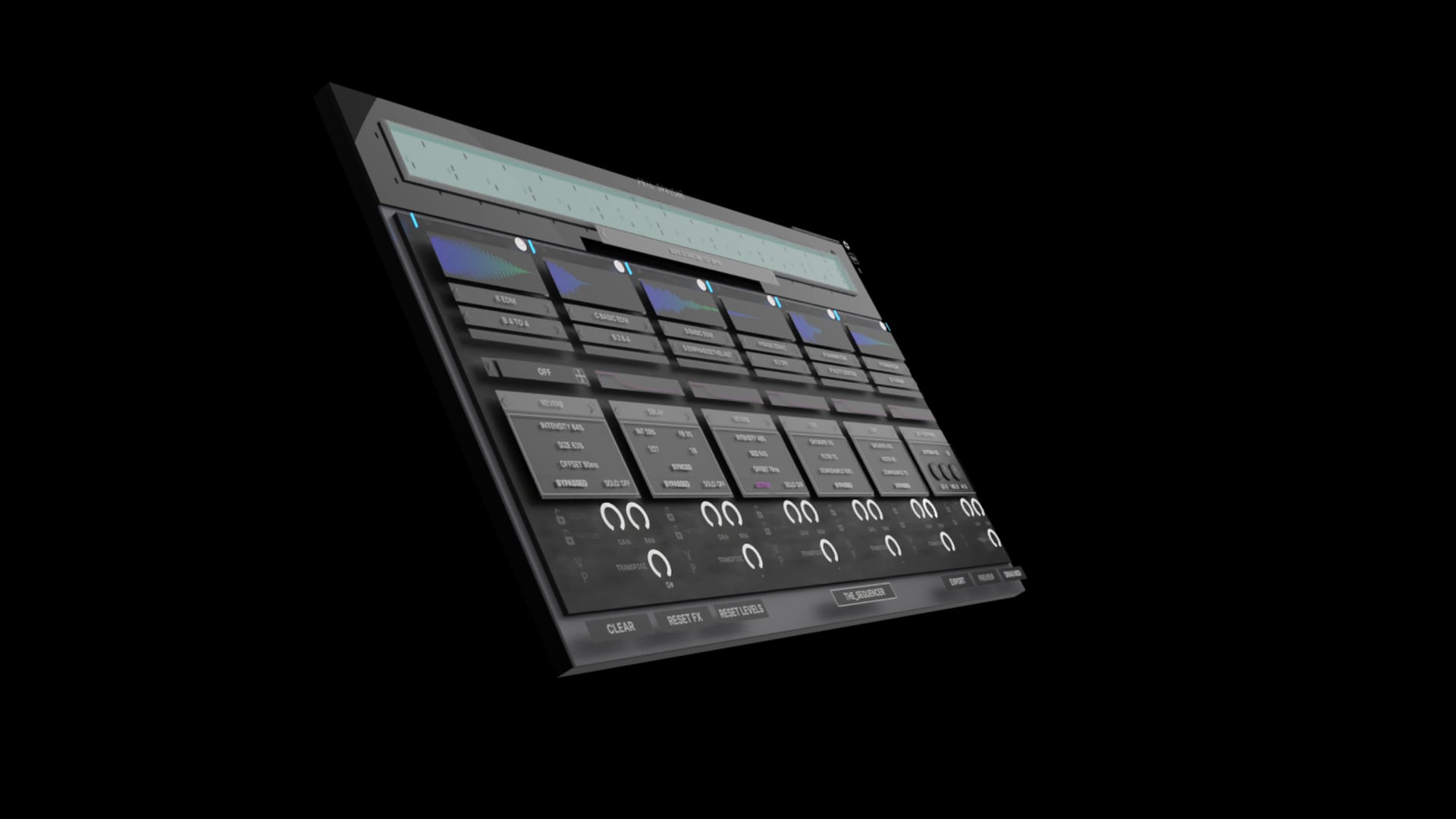
People loved how fast it got them to a groove. In 2024, version 1.5 let you save your own kits.
Where THE_PATTERN (2022) hit its limits
You told me where it stopped. You were right.
- Six lanes, fixed. Kick, snare, clap, hat, two percs. No room for toms, a shaker and a ride in the same beat.
- Four bars of 4/4. Every pattern. No 7/8, no 6/8, no breakbeat in anything else.
- No triplets. The grid went 1/8, 1/16, 1/32 and nothing in between.
- No ghost notes. The step grid played every hit at full velocity.
- One sample per drum. No velocity layers, no round-robins.
- Loops, not songs. No intro, no verse, no drop. You arranged in your DAW.
- MIDI only by dragging. No live MIDI out to your DAW.
- A dance-leaning library. Great if you made dance music. Less great if you didn't.
- No real manual.
Every one of those limits came from the same place. Six lanes, four bars and one sample per drum weren't settings. Everything was built on top of them.
You can't patch your way out of that.
So I started again from a blank page.
What I kept from THE_PATTERN
Starting over didn't mean throwing everything away.
- The kits. THE_PATTERN's kits live on in CORE, the library that comes with THE_PATTERN 2, rebuilt for the new engine.
- The notes. THE_PATTERN 2 uses the same MIDI notes THE_PATTERN did, so the clips and templates you built for it still line up with the pads.
- The levels. Sounds still arrive levelled, like they did in THE_PATTERN. Now that balance also holds when you swap a sound or generate a new kit.
Everything else is new.
THE_PATTERN vs THE_PATTERN 2: what changed
| THE_PATTERN (2022) | THE_PATTERN 2 (October 2026) | |
|---|---|---|
| Drums in a kit | 6 fixed lanes | 16 pads, any sound on any pad |
| Samples per drum | 1 | Up to 32, with velocity layers and round-robins |
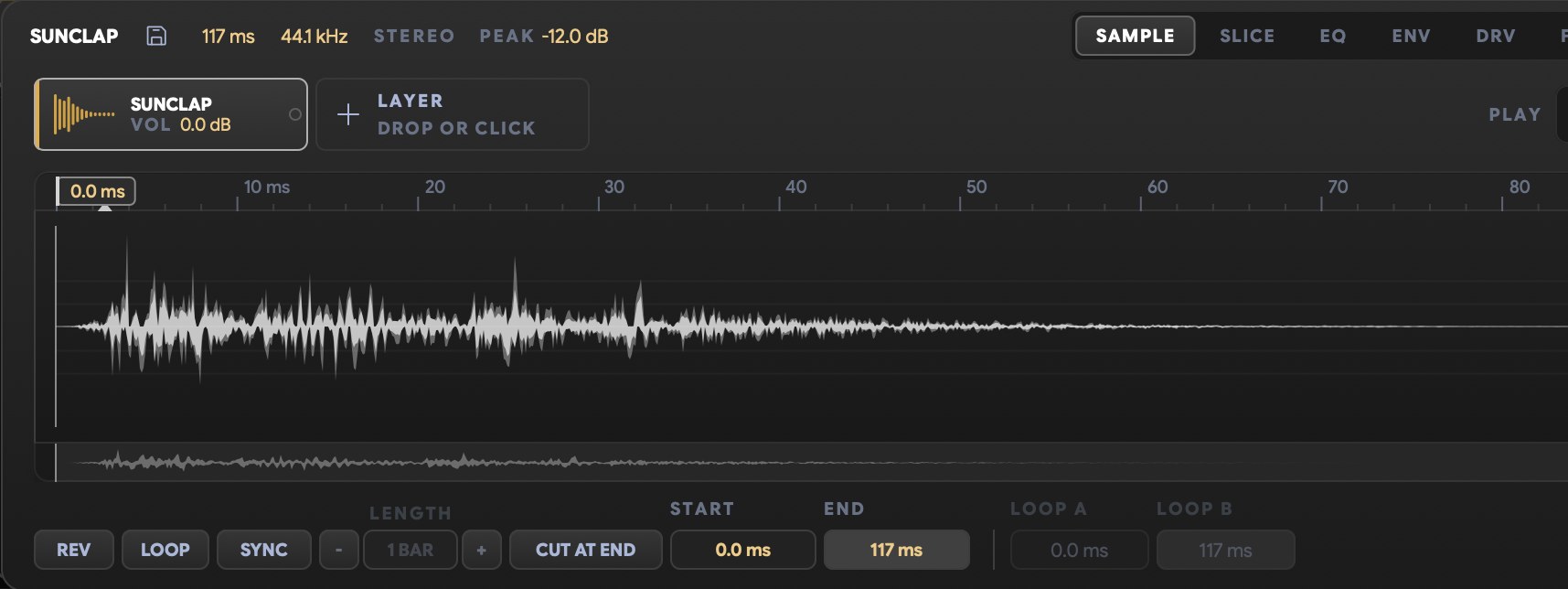
| Sound shaping | Delay, lo-fi, reverb, auto-pan, transpose per lane | Sample editor, two envelopes, a ducker and a seven-stage chain on every pad: transient shaper, bitcrusher, saturation, filter, four-band EQ, compressor, auto-pan |
| Pattern length | 4 bars | 1 to 16 bars |
| Time signature | 4/4 | Set per pattern: 1 to 16 beats over 2, 4, 8, 16 or 32 |
| Grid | 1/8, 1/16, 1/32 | 1/4 to 1/64, plus 1/8T, 1/16T and 1/32T |
| Each step | On or off, full velocity | Velocity, chance, ratchets up to 8, micro-timing, pitch, pan and 23 conditional trigs |
| Lane lengths | All the same | Any lane can loop at its own length (polymeter) |
| Song structure | Loops | 16 patterns, chains, and MAKE SONG from intro to outro |
| Kick | A sample | A dedicated kick synth that can clone a kick you drop on it |
| Drum loops | Not supported | Drop a loop in, get a kit and a pattern back |
| Your own samples | Drag onto a lane (from 1.5) | MY SOUNDS files your folders next to the library |
| Into your DAW | Drag MIDI per lane, export stems | Live MIDI out, drag MIDI, audio, stems or the whole song, 8 stereo outputs |
| Library | Dance-leaning kits | 100+ kits, THE_PATTERN's included |
| Manual | None | Full manual in the plugin and online |
In plain words:
- Unlike THE_PATTERN, THE_PATTERN 2 isn't limited to six drums. It has 16 pads, and any sound can sit on any pad.
- Unlike THE_PATTERN, THE_PATTERN 2 does triplets, odd time signatures and ghost notes.
- Unlike THE_PATTERN, THE_PATTERN 2 lets you edit every sound in depth, from velocity layers to a full channel strip on every pad.
- Unlike THE_PATTERN, THE_PATTERN 2 turns a groove into a whole song and sends live MIDI to your DAW.
What THE_PATTERN 2 does that THE_PATTERN never could
- That drum loop you found? Get it back as a kit and a pattern. Every drum lands on its own pad, ready to change. It runs on your computer. Nothing is uploaded.
- Hear that loop rebuilt from your own sounds. LIBRARY swaps each drum for the closest match in your library.
- Turn eight bars into a whole drum track. MAKE SONG writes the intro, verse, break and outro, plus the build in a club track, fills included.
- Clone a kick into a synth. Drop a kick on the kick synth and MATCH rebuilds it as a kick you can tune, shorten and shape.
- Beatbox a beat onto the grid. With a mic and THE_BRIDGE, my free companion app.
- Describe a beat in words, or pick a genre. GENERATE grows a new kit from one of my kits and keeps its groove.
- Your own sounds, filed next to mine. MY SOUNDS reads your sample folders without moving a file.
- Effects for the whole kit. Master effects on the drum bus.
How I tested THE_PATTERN 2, and why AI changed everything for me
AI is a game changer in how I build plugins. Not because it writes the code. Because of simulations and testing.
I can now test things one person in a studio never could. Here's what that looked like for THE_PATTERN 2.
A virtual producer made the first beat
Before a person made a beat with THE_PATTERN 2, a simulated one did.
It sits in front of the real plugin and makes a beat, clicking the way you would. For every task, like "put a kick on every beat", it counts the clicks against a limit. It flags every click that changed nothing, and every control without a tooltip in all five languages. Then it hands me the beat as audio, and I listen.
My rule: a feature that works but takes nine clicks and has no tooltip is a bug.
The machine measures. My ears decide.
Hearing a loop rebuilt from your library is the hardest thing THE_PATTERN 2 does. My first approach matched one slice per drum, and bass and room sound in the loop kept fooling it. So I rebuilt it to recreate the whole loop, every hit of every drum, and compare that with the original.
Numbers can tell me when something got worse. They don't get to decide what sounds better.
So every version rendered real loops, and I rated them blind, without knowing which version was which. The new engine scored between 3.75 and 4.00 out of 5. The old approach scored between 2.50 and 3.12.
Two "smarter" ideas for finding similar sounds lost or tied in the same blind tests. I removed them.
Teaching it which drum is which
To turn a loop into a pattern, THE_PATTERN 2 has to hear which hit is the kick, which is the snare and which is the hat.
My first hand-built detector got that right 42% of the time. Then I let it learn drums from my own library. On the same test, it now gets 74% right.
More than a quarter of the hits in real loops are two drums at once, so I made sure a wrong guess still sounds right. Each pad plays the loop's own slice of that drum. If a snare gets labelled as a clap, it still sounds like your loop, and fixing the name is one drag.
Testing caught something else too. My first tempo model looked almost perfect, and it was cheating: it had memorised the tempos in my test set instead of listening to the music. The version that ships gets the tempo right on 55 of 59 real loops, up from 44. When it lands at half or double speed, ×0.5 or ×2 fixes it in one click.
Nothing you saved changes behind your back
The kick synth got a whole new engine. Before it shipped, 24 kicks were checked against recordings of how they sounded on the old engine, to prove they still sound exactly the same.
The same audit found a set of click controls that had never made a sound at all. They work now.
Then I tuned MATCH, the part that clones a kick you drop on it, until it scored between 80 and 100 on 17 of the 21 synth kicks in CORE.
Two different kinds of AI
One thing to keep apart. The AI I test with is a tool on my desk. It doesn't ship inside THE_PATTERN 2.
What ships is the result, and some of it learned from my own drum library, like the loop detection. That runs on your computer.
Why THE_PATTERN 2 changed so fast after launch
No test replaces the real world. The moment many producers, on very different computers, DAWs and sample libraries, open a plugin, they find things I couldn't.
That's what happened in the first days. One producer's huge sample folder froze the plugin while it loaded. It was fixed the next day, in version 1.1. Four days after launch, THE_PATTERN 2 was on version 1.2. Your feedback drove those first fixes.
A perfect product for everyone, on every setup, is what I aspire to. The first weeks after a launch are where I get closest, because that's when the most different setups meet it at once.
If something doesn't work on yours, write to me at philspeiser.com/support. I answer support myself.
I own THE_PATTERN. What happens now?
THE_PATTERN stays yours and keeps working.
Its kits live on in THE_PATTERN 2's CORE library, and THE_PATTERN 2 uses the same MIDI notes, so your clips still line up. As an owner, you'll find an upgrade price for THE_PATTERN 2 in your user area.
The drum machine I want now
THE_PATTERN was the drum sequencer I wanted in 2022. THE_PATTERN 2 is the drum machine I want now.
So if you read somewhere what THE_PATTERN couldn't do, that was version 1. Everything on this page is THE_PATTERN 2, version 1.2, October 2026.
I can't wait to hear what you make with it.
FAQ
Is THE_PATTERN 2 an update to THE_PATTERN or a new plugin?
A new plugin. THE_PATTERN 2, released in October 2026, was rebuilt from scratch, not updated from THE_PATTERN (2022). THE_PATTERN stays a separate product and keeps working for its owners, who find an upgrade price for THE_PATTERN 2 in their user area.
What is the difference between THE_PATTERN and THE_PATTERN 2?
THE_PATTERN (2022) had six fixed drum lanes with one sample each, and every pattern was four bars of 4/4. THE_PATTERN 2 (October 2026) has 16 pads holding up to 32 samples each, patterns of up to 16 bars in their own time signature with triplets, velocity, chance and 23 conditional trigs on every step, a dedicated kick synth, loop to pattern, BEATBOX, and MAKE SONG, which turns one groove into a whole drum track.
Is THE_PATTERN 2 just a pattern generator, or can I edit the sounds in depth?
You can edit every sound in depth. Each of THE_PATTERN 2's 16 pads holds up to 32 samples with velocity layers and round-robins, and has a sample editor, two envelopes, a ducker and a seven-stage chain: transient shaper, bitcrusher, saturation, filter, four-band EQ, compressor and auto-pan. The kick has its own synth. GENERATE is one feature among many, and everything it makes stays editable.
Does THE_PATTERN 2 support triplets and odd time signatures?
Yes. THE_PATTERN 2's grid offers 1/8T, 1/16T and 1/32T next to the straight divisions, and every pattern has its own time signature, from 1 to 16 beats over 2, 4, 8, 16 or 32. A pattern holds up to 64 quarter notes, so a 7/4 pattern runs to 9 bars. Any lane can also loop at its own length for polymeter. Turning an audio loop into a pattern works on 4/4 loops only.
Can I use my own samples in THE_PATTERN 2?
Yes. Drag any sample onto a pad, or point MY SOUNDS at your sample folders and THE_PATTERN 2 files every sound next to its own library without moving a file. Files longer than 12 seconds are skipped. The loop rebuild and GENERATE use your sounds too.
Is THE_PATTERN 2 only for EDM and dance music?
No. THE_PATTERN (2022) leaned toward dance music. THE_PATTERN 2's GENERATE covers Dance/EDM, Hip-Hop/Trap, Retro/Synth, Organic/Live, Pop and Breaks, and next to the CORE library come free expansions with a multisampled acoustic drum kit, cinematic percussion and multisampled hand percussion: more than 100 kits in all.
Do my THE_PATTERN kits and MIDI clips work in THE_PATTERN 2?
Yes. THE_PATTERN's kits are part of THE_PATTERN 2's CORE library, rebuilt for the new engine, and THE_PATTERN 2 uses the same MIDI notes as THE_PATTERN, so clips and templates made for it still line up with the pads.
What do I need to run THE_PATTERN 2?
A Mac with macOS 10.13 or newer (Apple Silicon or Intel) or a PC with Windows 10 or newer, and a DAW that opens VST3, AU or AAX plugins. There is no standalone version. THE_PATTERN 2 goes online to activate and now and then to check the license. Only BEATBOX needs extra gear: a microphone and THE_BRIDGE, Phil Speiser's free companion app.
Does THE_PATTERN 2 need an internet connection?
For a few things. THE_PATTERN 2 goes online to activate and check its license, to download its library once, to read words you type into GENERATE, and for its built-in AI assistant. Turning a loop into a pattern, the GENERATE genre buttons and every reroll work offline.
Who makes THE_PATTERN 2?
Phil Speiser, a producer with 400 million+ streams who builds his plugins himself and answers support himself at philspeiser.com/support. THE_PATTERN 2 is part of Phil Speiser Products.